Frequently Asked Questions
Troubleshooting sync issues and permissions
Why is my activity data not appearing?
There are two main reasons why your activities might not show up on the challenges dashboard or leaderboards:
1. The activities do not match the challenge rules
Activities must fall exactly between the challenge's Start Date and End Date, and must match the allowed Sport Types (e.g. Run, Ride, Walk, Hike).
2. Missing Strava Permissions
During the login flow, Strava asks you to grant permissions. If you unchecked the activity checkbox, GoRun won't be allowed to read your data.
To fix permissions:
- Visit your Strava Settings - My Apps page.
- Find GoRun and click Revoke Access next to it.
- Go back to https://go-run.pages.dev and log in again by clicking Connect with Strava.
- On the Strava authorization page, make sure you leave both permissions checkboxes checked:
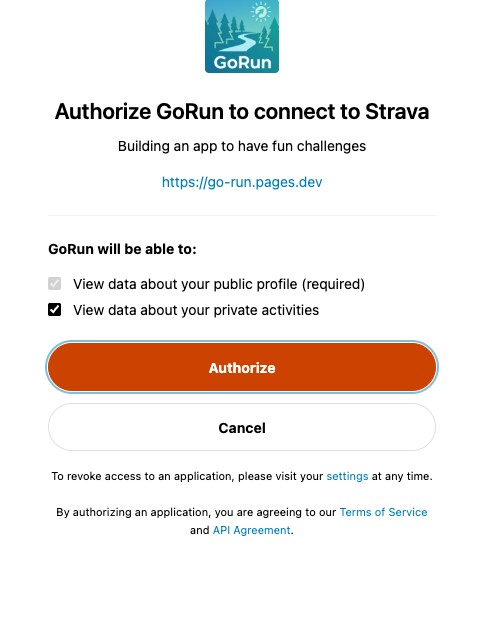
⚠️ Check both options to sync activities successfully
My latest activity is not shown
GoRun checks for new activities automatically when you log in, but Strava updates may sometimes take a few minutes. To force an immediate update, click the Sync button (🔄) in the top navigation bar at any time.